Tenant Architecture Documentation
Tenant Architecture
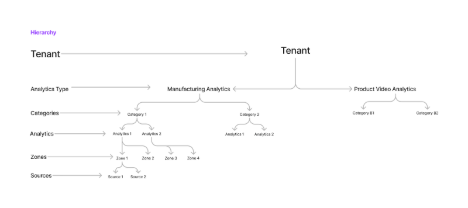
Tenant
A tenant is defined as an individual or organization that utilizes the Eizen platform or its services. In our system, a tenant typically represents a distinct entity, complete with its own resources, configurations, and data. This can include businesses, institutions, or individuals who subscribe to Eizen services to access functionalities or solutions tailored to their specific needs. Each tenant operates within an isolated environment, ensuring data privacy, security, and customization according to their requirements.
Tenant Admin
A tenant admin, or tenant administrator, is a designated user within a tenant organization who possesses administrative privileges and responsibilities for managing the tenant's account and resources on our platform. Tenant admins play a vital role in overseeing and controlling various aspects of the tenant's environment, including user access permissions, configuration settings, data management, and account billing. They serve as the primary point of contact for both internal and external communications regarding the tenant's account, ensuring smooth operations, compliance, and alignment with organizational goals and policies.
Analytics Type
Analytics types refer to the various lines of business categorized by different domains. For instance, Manufacturing Analytics and Product Video Analytics are examples of distinct analytics types.
When creating a new analytics type, the Eizen admin must provide a name for the analytics type.
Analytics Categories
Categories are specific to each analytics type. For example, Manufacturing Analytics can include categories such as machines and operators, while Product Video Analytics may have brands as categories.
The Eizen admin is responsible for creating categories based on tenant requirements. When creating categories, the admin must specify a category name and select the corresponding analytics type.
Analytics
Analytics are specific to categories and may also involve regions or subcategories. For example, Manufacturing Analytics is a category.
The Eizen admin must create analytics based on tenant requirements. During the creation process, the admin adds an analytics name and selects the appropriate analytics type.
Zones
Zones can be tailored to specific workspaces or rooms, depending on your use cases.
Tenant admins can create zones that are specific to analytics and categories. To create a zone, the admin must add a zone name and select the relevant analytics.
Sources
Sources refer to video inputs, such as camera streams or YouTube videos, based on your use case.
Tenant admins can add sources that are specific to analytics. To create a source, the admin must provide a source name, description, username, password, source type, source URL, and select the corresponding analytics or zone.
AI Models
AI models need to be added and mapped to sources to generate analytics. These models will be integrated into the user interface by the Eizen admin, while the tenant admin is responsible for mapping the model to the source during the addition of a new source.
Examples of Different Analytic Entities
| Tenants | Unilever | LSET | Apollo |
|---|---|---|---|
| Analytics Type | Product Video Analytics | Zoo Analytics | Healthcare Analytics |
| Analytics Categories | Haircare, Beauty, Food | Monkey, Bird | Patient Monitoring, Visitor Management |
| Zones | Lakme, Cornetto, Vim, etc. | Hawkheaded Parrot, Duskyheaded, etc. | Critical Zone, Isolation Zone, ICU, etc. |
| Sources | Offline Videos, Real-time Video Ads | Real-time Camera Streaming, Offline Videos | Real-time Camera Streaming, Offline Videos |
| Source Models | Detection Model, Re-Identification Model | Bird Detection Model, Monkey Detection Model, Re-Identification Model | Activity Recognition Model, Re-Identification Model |